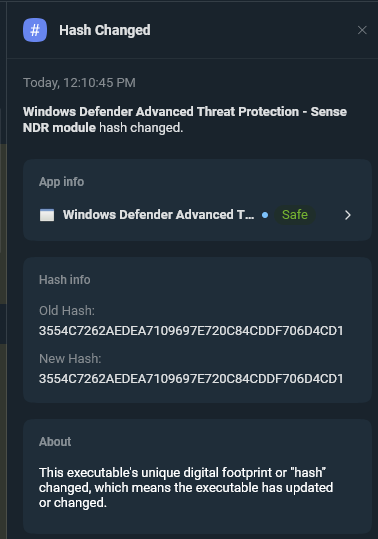
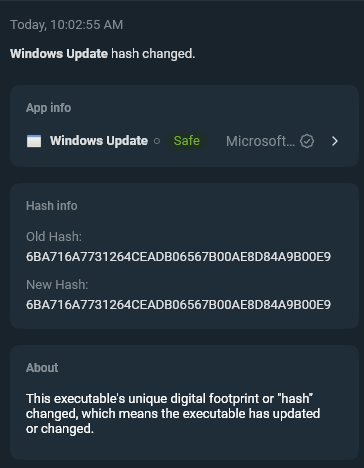
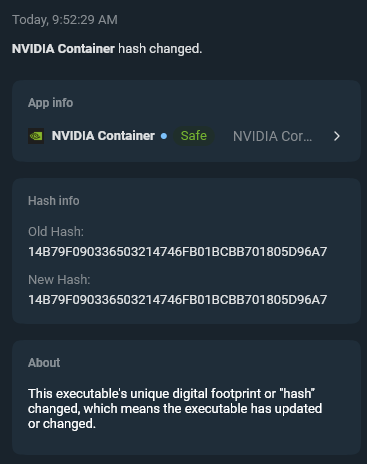
I’m getting notifications of binary changed and hash changed, but when I open the notification, the old hash and new hash are exactly the same.
Is this a misinterpretation, an error or some injection on the executable?
An example below
I’m getting notifications of binary changed and hash changed, but when I open the notification, the old hash and new hash are exactly the same.
Is this a misinterpretation, an error or some injection on the executable?
An example below
Interesting! I have not seen this before. I’ll discuss with our team and see if they have an idea.
I can say that on my system (Windows 11 24H2 build 26100.6899, updated 2 days ago) the file C:\Program Files\Windows Defender Advanced Threat Protection\SenseNdr.exe was digitally signed on 26th September and it has hash sha-1: AB8C33FF40E95B29BE316B68679D9B2433F8EC20
The hash sha-1 posted by user cborchichi is related to a older file digitally signed on 16th July, as you can see in webpage VirusTotal I searched there for hash 3554C7262AEDEA7109697E720C84CDDF706D4CD1
Thanks Kaliban. Checked manually, yep… same hash that you have (see below). How then the SpyShelter reports something old? Is something impeding checking? from where it is getting the old hashes?
You’re welcome. I’m not a SpyShelter user but I hope that Carl can pinpoint the issue with the help of SpyShelter team.
Carl, do you have any news? The issue continues… (I just post one example, there are many files that have the same issue ~20-30 after each restart)
It could be that SenseNdr.exe previous version was effectively digitally signed on 16th July so the old hashes are related to the files that have been replaced but anyway SpyShelter miscalculate the hashes of the new files versions, as your last post has demonstrated.
If you have recently updated Windows 11 to the latest build it could be that the OS update broke SpyShelter capability to calculate the new hashes, at least for Microsoft files, I don’t know if the same issue occurs also for non-Microsoft files. Mine it’s just a theory, of course.
Windows 11 updates are released every second Tuesday of the month, two days ago I updated Windows 11 24H2 to the latest build 26100.6899
@cborchichi If you look at the properties of the files in Windows, do they look identical?
If you upload them to VirusTotal (if it’s safe to do so for privacy reasons) are they identical? Or, use a third party tool to check the hashes also if possible?
We are unable to reproduce this so far.
Hi Carl,
I can’t speak for user cborchichi but I don’t think he can compare the hashes of the 2 versions of the same file (old and new). He can only verify the hash of the file just updated or changed because the old version it is now overwritten.
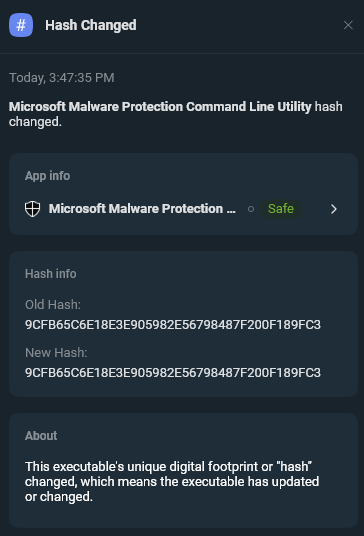
About the last image he posted I can say it’s related to Microsoft Malware Protection Command Line Utility MpCmdRun.exe, 4.18.25090.3009 version, digitally signed on 30th September 2025 as you can see on VirusTotal
If he recently updated his OS that version was overwritten by a new file version, but SpyShelter was unable to calculate the new hash, even if it warned that the hash has changed.
The same issue occured previously with SenseNdr.exe
This is what I think but I’m not a technician so I could be wrong, of course.
I wonder if Microsoft somehow blocks visibility into certain Malware Protection files they have for security reasons.
I don’t think so, otherwise neither me or cborchichi wouldn’t have been able to to calculate the SHA1 hash of the updated version of C:\Program Files\Windows Defender Advanced Threat Protection\SenseNdr.exe, a component of Microsoft antivirus. You have a dedicated webpage on your website about this file What is SenseNdr.exe (Windows Defender Advanced Threat Protection - Sense NDR module)? 4 reasons to/NOT trust it
For calculating the SHA1 hash I used an external program and cborchichi used a command line prompt.
Furthermore submitting SenseNdr.exe to VirusTotal shows all details about it, included all types of file hashes, as you can see from the link below.
Good Morning, the saga continues…
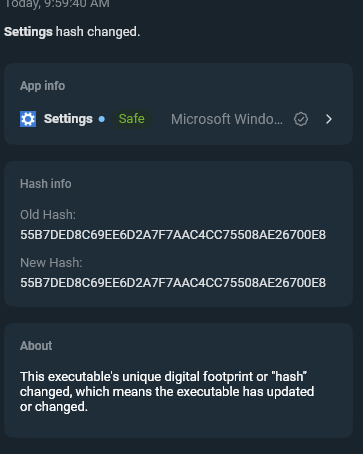
As I said, there are ~20-30 files (today: 39) that get the same notification from SpyShelter saying that the “binary changed” without changing the hash, and are not only Microsoft or Microsoft Security files, I will post 3 below, with the command line hashes (I can also check with VirusTotal, just in case)
Powershell: certutil -hashfile ‘C:\Windows\ImmersiveControlPanel\SystemSettings.exe’ sha1
SHA1 hash of C:\Windows\ImmersiveControlPanel\SystemSettings.exe:
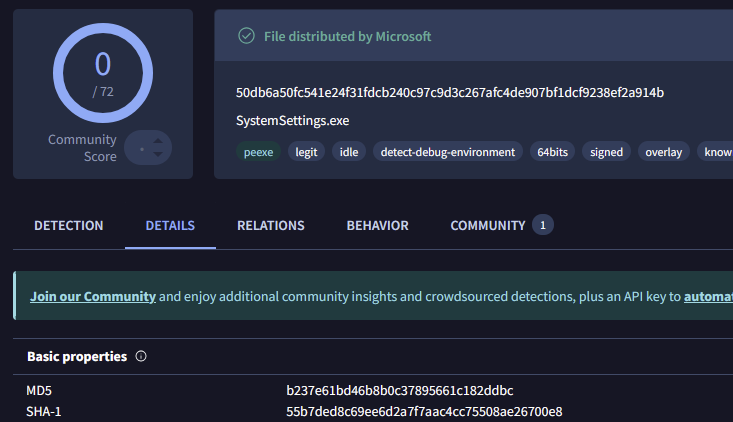
55b7ded8c69ee6d2a7f7aac4cc75508ae26700e8
VirusTotal
===========================================================================
certutil -hashfile ‘C:\Windows\UUS\amd64\wuaucltcore.exe’ sha1
SHA1 hash of C:\Windows\UUS\amd64\wuaucltcore.exe:
6ba716a7731264ceadb06567b00ae8d84a9b00e9
==================================================================
SHA1 hash of C:\Windows\System32\DriverStore\FileRepository\nvlt.inf_amd64_35c5f766fd22cb74\Display.NvContainer\NVDisplay.Container.exe:
14b79f090336503214746fb01bcbb701805d96a7
Checked with VirusTotal… same result
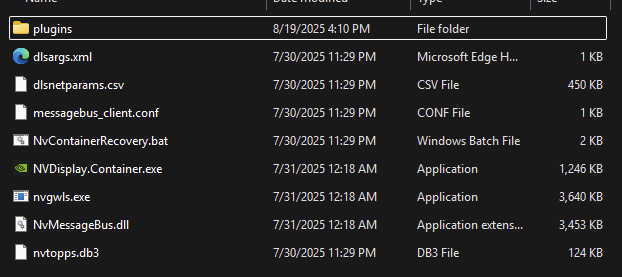
File does not change since July 31st, 2025
I’m guessing that some file used by SpyShelter to save the hashes (I do not know if one file like that exists) maybe does not get updated, or there is some permission to modify the file that is lost or missing or insufficient (?)
I’m use a standard user account everyday (no admin rights), and use the admin just occasionally if there is something that has to be done that requires it. I have Cisco Duo (mentioning just in case), and all the security options from Windows Security activated except the ones that requires the virtual environment activated because I’m normally works on VMware VMs (so during setup I followed this guide: How to Disable Hyper-V in Windows 11 24H2 | VMware Workstation)
I really would like to know if (maybe) I have something else running here that I cannot detect with Windows Security, Malwarebytes (just running the free installation with occasional manual running including rootkit checks) or SpyShelter.
Thank you guys in advance.
CB
Hello,
maybe SpyShelter has a diagnostic log of some sort. As I wrote in a previous post I’m not a SpyShelter user so I don’t know if such a log does exist.
Also if some SpyShelter file became corrupted maybe a complete uninstall / reinstall of it could solve your issue. If you choose to do that be sure to export your SpyShelter settings / rules to a file, provided that SpyShelter has an option to do so. A year and a half ago I suggested to implement this feature but I don’t know if SpyShelter team did it in a subsequent release. Option to backup rules and settings
Good news, we just reproduce this! So now we are figuring it out.
Hi…I’m new on forum but as a long-term user of old SS I remember specific command in alert window to disable checking hash of alerted executable. Is it similar feature in current version?
We don’t have that feature at this time, but thanks for your feedback on whitelisting or ignoring some hash changes, or some executables totally… I think we used to have a ticket to have a way to white list or ignore some executables completely for developers. I will check on the status of that concept. Thanks!